
Support leaders share the same headache — tickets keep piling up, but adding more agents isn’t an option. AI-driven knowledge bases can cover the gaps.
![→ Access Now: 50 Customer Service Email Templates [Free Resource]](https://no-cache.hubspot.com/cta/default/53/9a8328ad-9a07-4f92-aa9c-468dc3a4a9d7.png)
An AI knowledge base uses artificial intelligence to deliver accurate answers to customers. AI tools, like HubSpot’s AI agent Breeze, can help teams craft knowledge base documentation to solve common issues. Chatbot integrations can speed up replies while keeping the human touch.
This article features seven AI knowledge base examples from companies utilizing AI and explores:
- Knowledge base features that improve user experience.
- KB examples by company size and use case.
- How CX leaders can replicate the same playbooks in HubSpot Service Hub.
Table of Contents
- Top 5 AI Knowledge Base Features That Improve the User Experience.
- AI Knowledge Base Examples From Companies That Cut It
- Buyer’s Checklist for the Best AI Knowledge Base Software
- Tips for Building AI Knowledge Bases
- Frequently Asked Questions About AI Knowledge Bases
Top 5 AI Knowledge Base Features That Improve the User Experience
AI transforms a static knowledge base into an adaptive system that learns from usage patterns, agent input, and customer interactions. In fact, pairing an AI knowledge base agent with a customer agent can cut resolution times by 40%, according to HubSpot’s research. HubSpot also found that an AI system can resolve nearly half of support tickets autonomously,
Before showing AI knowledge base examples, these artificial intelligence features make support documentation easier to use and maintain.
AI can create knowledge base content.
The most common use case for leveraging AI is creating knowledge base documents. AI tools can ingest information from support tickets, new product release announcements, and webinars. From there, agents like HubSpot Breeze can write knowledge base articles.
Here’s a personal AI knowledge base example: In my current customer success role, I’m working through this process firsthand by using AI to repurpose webinar content into written articles. That starts with uploading a webinar into an AI tool and asking it to create a guide with clear steps.
While it’s taken a few iterations and prompt adjustments to get where I want it, I’m really excited about the output I’ve landed on. It’s made this process so much easier than trying to pluck out insights from a webinar transcript and write the guide myself.
Pro tip: I ask the tool to write the prompt from a specific point of view or persona. For example, if my webinar presenter is a marketing industry professional, I may create a prompt that says, “You are a marketing director. Create a guide in a helpful tone and include step-by-step guidance where relevant.”
AI flags underperforming articles and drafts for updates.
Knowledge bases degrade when content becomes outdated or irrelevant. Articles with high fallback rates or low usage are a signal to the system that answers are no longer effective.
AI automates the review process and shortens the cycle between identifying gaps and publishing revisions.
In addition, many AI tools will make suggestions for revising the content (or creating something new) to address any gaps. AI can also identify duplicate articles or out-of-date information, recently updated policies, or feature releases that require updated documents. This helps you keep your knowledge base up to date in a more timely manner.
Pro tip: In HubSpot Service Hub, build a content review workflow that flags underperforming articles based on a review trigger:
- Older than 6 months.
- Low usage/low views.
- High fallback (lots of support/help requests from the page).
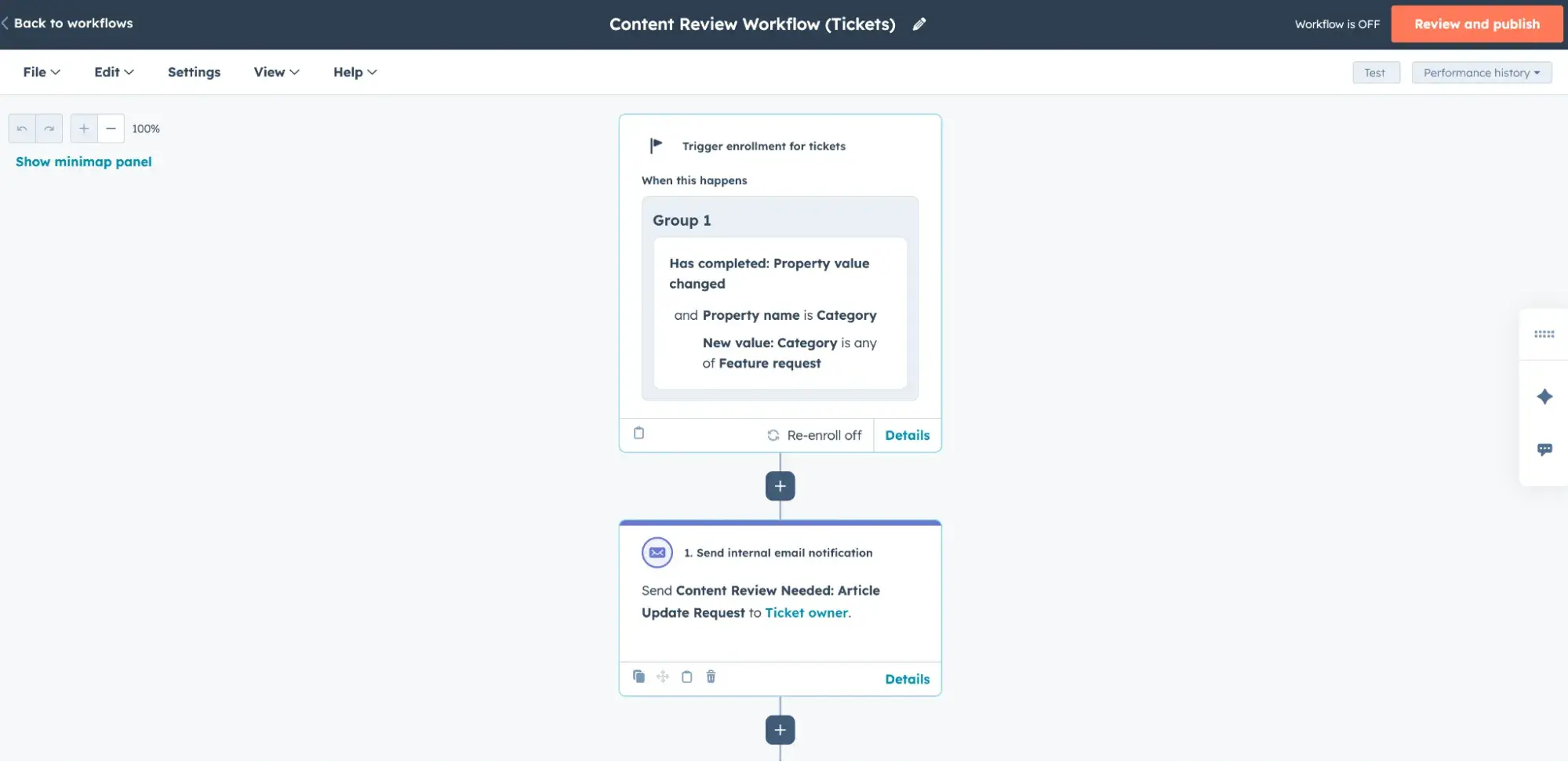
Use Breeze Intelligence to create draft updates and automatically route them to subject matter experts for approval before publishing in the HubSpot knowledge base software.
AI-drafted replies for customer success agents.
Customer success agents often spend a large share of their time drafting responses to repetitive questions. AI changes this by generating draft replies sourced from knowledge base content and prior conversation history. Automating draft creation shifts the agent’s role from writing to reviewing, improves response consistency, and speeds ticket resolution.
Pro tip: Use HubSpot’s Reply Recommendations in Help Desk, which suggests contextually relevant replies directly inside the agent workspace.
AI can keep your knowledge base organized.
AI can also correctly tag and organize documents. That helps keep knowledge bases organized, saving reps from hours of manual work. AI can look at things like the article’s product or topic in order to classify articles, which makes it easier for agents and customers to find the information.
AI-driven multilingual knowledge base.
Finally, AI is a fantastic tool for translating documentation. As companies scale, teams may need to update support documentation to reflect new languages. AI can easily translate your existing documentation into new languages.
Beyond that, AI can map KB articles to the customer’s language preference in the CRM, which ensures a smooth customer experience and higher satisfaction scores. No more international customers are left to navigate English-only help content.
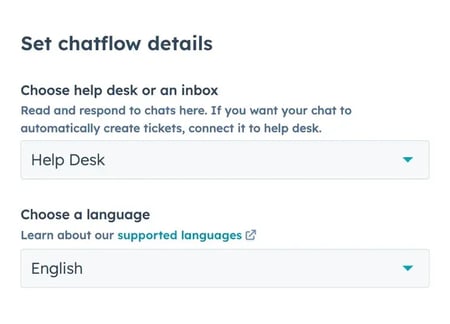
Pro tip: Create language variations directly in HubSpot Service Hub, configure chat targeting, and map language preferences in Smart CRM. Start with high-volume markets to prove value before scaling to all supported regions.
AI Knowledge Base Examples From Companies That Cut It
AI knowledge bases are no longer experimental add-ons. Today, AI-powered support is a core infrastructure of customer support. Of the customer experience leaders who participated in HubSpot’s State of Service report, 65% said their teams already use AI across customer experience operations.
The following AI knowledge base examples illustrate how organizations at different growth stages implement AI features and see a positive impact.
Startup AI Knowledge Base Examples
Small SaaS teams don’t have the headcount to absorb ticket growth. Companies reduce support ticket volume by implementing AI-powered knowledge bases. They start small, scope narrowly, and still free up agent time.
Startup SaaS AI knowledge base example: RevPartners deflects repetitive onboarding questions with HubSpot AI.
RevPartners is a RevOps SaaS consultancy that builds go-to-market systems on HubSpot. Recently, they launched a Breeze Customer Agent called Jarvis. In just 30 days, the team cut down their repetitive support load.
The focus wasn’t on building a chatbot for everything. Instead, the team focused on deflecting the same SaaS onboarding and pricing questions their team kept answering over and over.
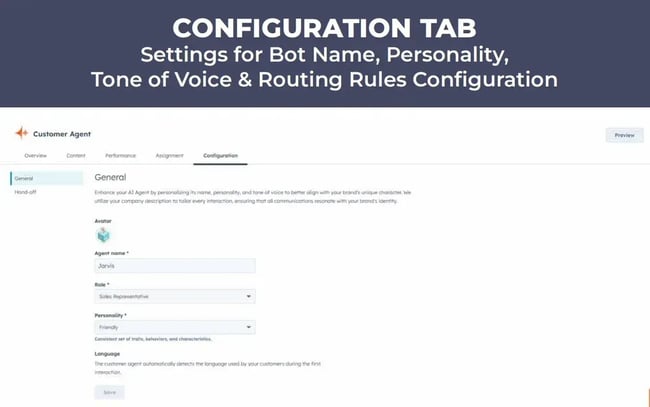
How to Replicate This AI Knowledge Base Example in HubSpot
- In Service Hub, tag the 10-20 most common onboarding and billing questions.
- Load those articles into the Breeze Customer Agent as the training corpus.
- Set fallback rules. For low-confidence answers, route to a human with knowledge base links and CRM context.
- Measure deflection rate (resolved without agent) and time-to-first-response weekly.
- Use the gaps surfaced in fallbacks to guide your next KB article updates.
Why This AI Knowledge Base Example Works
- RevPartners trains the agent only on approved knowledge base articles, FAQs, and short internal docs. That discipline keeps answers accurate.
- They add fallback rules and routing. If the AI can’t match with confidence, the conversation is escalated to a human with full context.
- They monitor resolution rates and fallback volume from week one, treating the AI like any other agent with performance KPIs.
Pro tip: Start by publishing those onboarding and billing articles directly inside the HubSpot knowledge base software. That’s where you can build articles, set deflection rules, and connect content to your CRM so the AI assistant never pulls from unapproved sources.
Small ecommerce AI knowledge Base example: Konnected’s AI agent excels at suggested replies.
Konnected is a DTC brand selling smart home alarm and automation panels. On their support hub, they introduced Kai, an AI-powered support specialist that sits alongside their knowledge base. Customers can ask questions directly in chat, and if Kai can’t answer confidently, the conversation escalates to a human agent with full context.
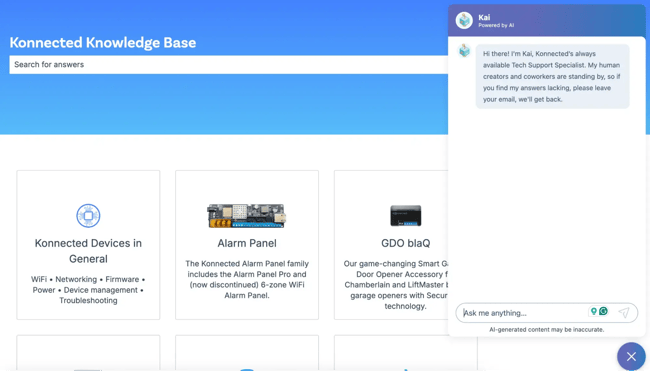
For DTC brands, this hybrid model shortens the drafting time for repetitive tickets and lets agents focus on more complex cases.
When I asked Kai for help with selecting garage openers, he thought for a few seconds and pulled up a quick breakdown of models and use cases. Kai also drafts replies like shipping clarifications or warranty coverage explanations. I found that Kai did an amazing job for an AI agent.
How to Replicate This Knowledge Base Example in HubSpot
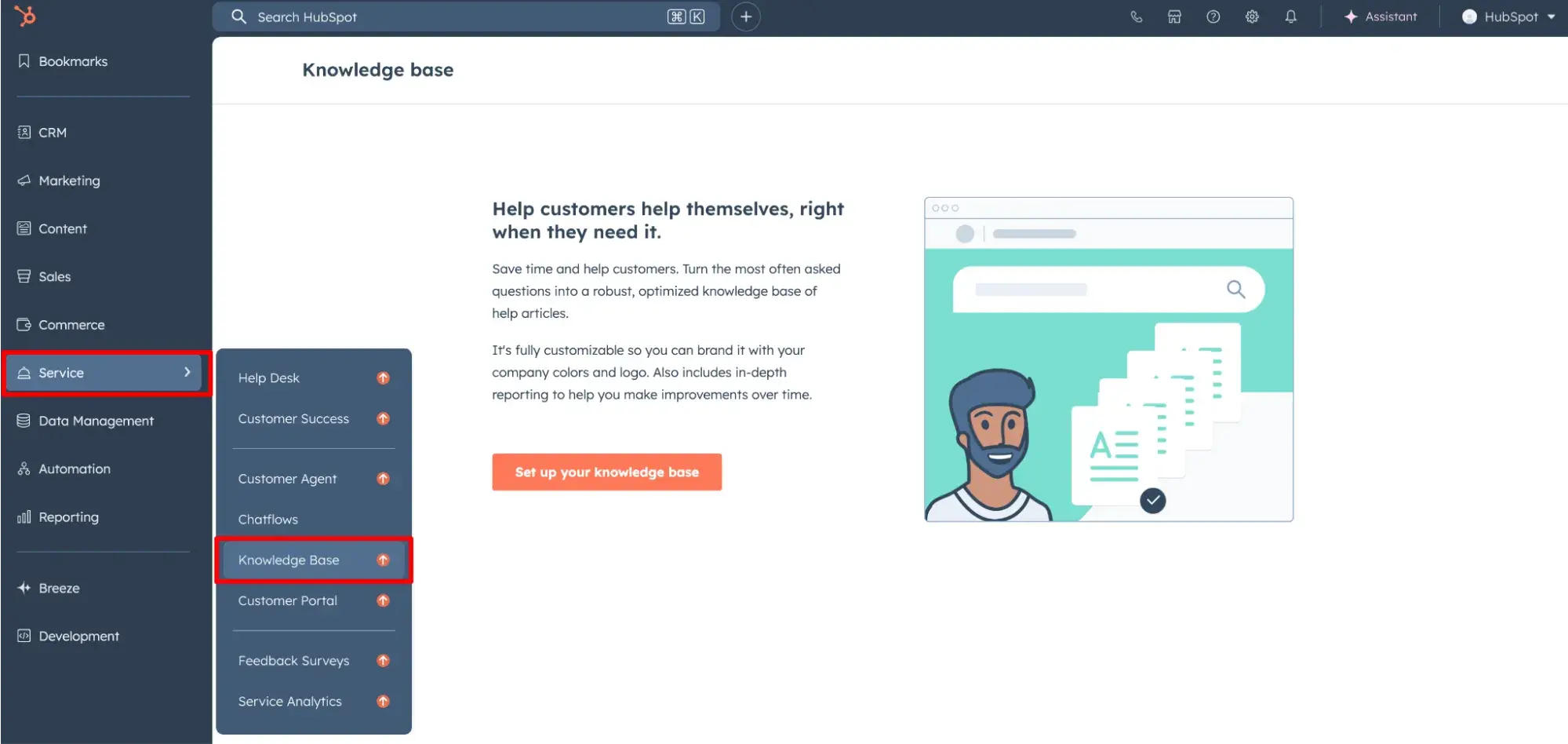
- Publish policy, order, and FAQ content in the HubSpot knowledge base software.
- Turn on Breeze Copilot in the inbox so agents get KB-driven draft replies next to every ticket. An AI knowledge base enables the agent to assist with suggested replies and content.
- Connect ecommerce order data to HubSpot’s Smart CRM, so AI-suggested replies can include shipping, warranty, or SKU-specific details. HubSpot Service Hub integrates with Breeze AI Suite and Smart CRM for unified support automation.
- Add fallback rules.
- Track metrics like suggestion usage rate, percent of issues resolved without an agent, and time saved per reply.
Why This AI Knowledge Base Example Works
- AI-suggested answers from the knowledge base: Kai pulls directly from approved Konnected knowledge base articles. This ensures suggestions are grounded in their own docs, not generic AI output.
- Order and policy context: When connected to order data and policies, Kai drafts replies like shipping clarifications or warranty coverage explanations. Agents see these drafts in their workspace and can send them as-is or edit for tone.
- Fallback rules: If Kai can’t answer, it prompts the user to leave their email. The ticket then routes to human agents with the full transcript and suggested KB matches attached, cutting time to resolution.
Mid‑market Knowledge Base Examples
Companies that scaled to mid-market are dealing with a new suite of support issues. They need to create handoff workflows based on plan tiers and provide multilingual answers. AI can help these teams level up.
Mid‑market SaaS example: Lemlist’s AI agent tailors deflection by plan tier.
Enterprise and high-tier clients demand a superior CS experience. For that, Lemlist provides personalized deflection by connecting the AI knowledge base with CRM data. Their chatbot analyzes whether or not a customer is on the Enterprise plan and decides who to route the ticket to.
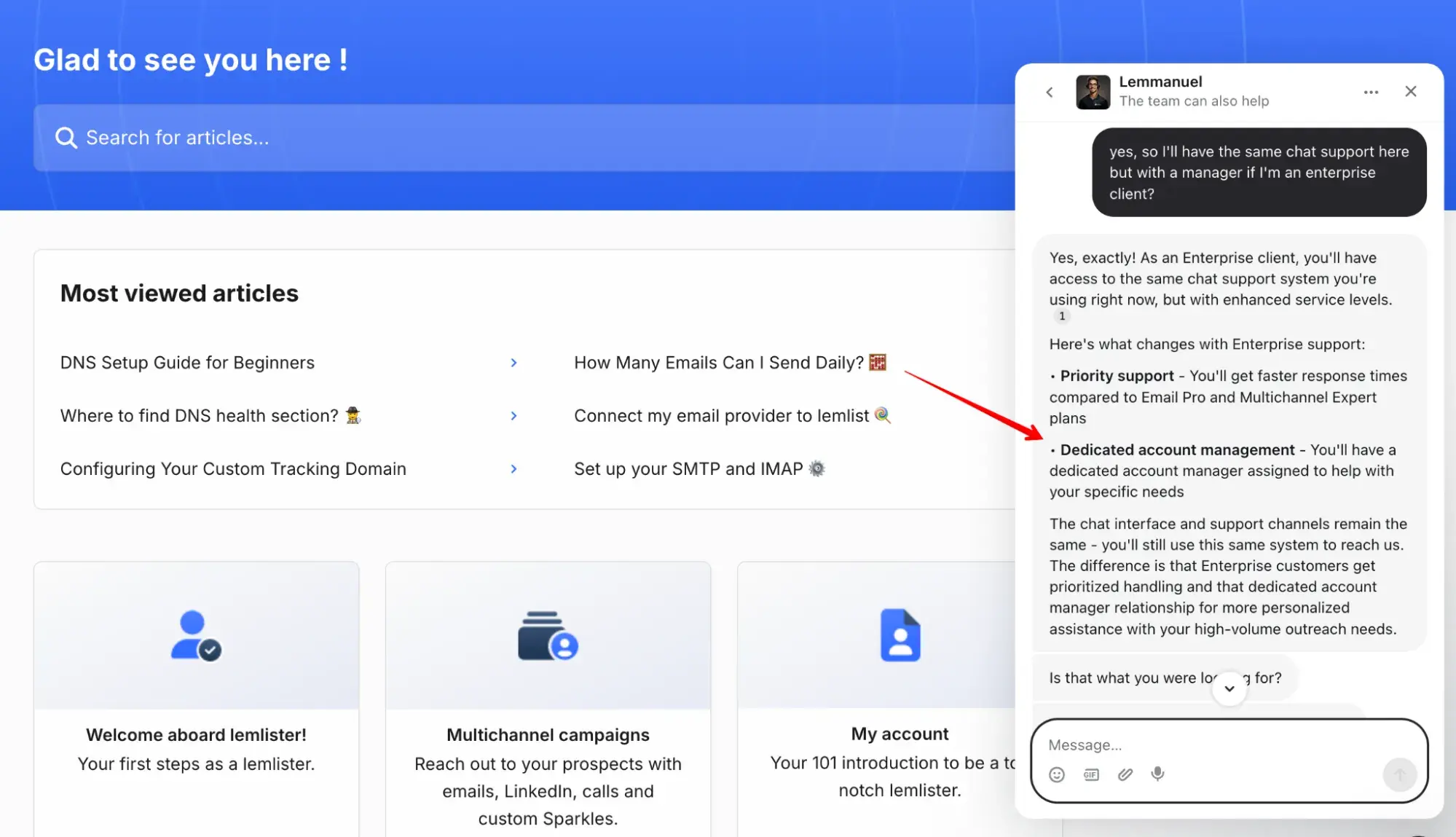
Why This AI Knowledge Base Example Works
- Personalized deflection prevents low-tier users from flooding agents.
- Balanced workload distribution across support tiers keeps enterprise agents focused on high-value customers.
Enterprise AI Knowledge Base Examples
Enterprises operate at a scale where fragmented support systems quickly undermine the global customer experience — especially when 82% of customers want their issues solved immediately. AI-driven knowledge bases also help reduce the need for massive agent headcount.
Let’s explore the most popular enterprise-level knowledge base features.
Enterprise online retailer example: Amazon uses a multilingual knowledge base and chatbots.
The world’s largest online retailer offers an unparalleled international user experience through AI-driven chatbots. These systems adapt to the language of each browser or switch to another language upon request.
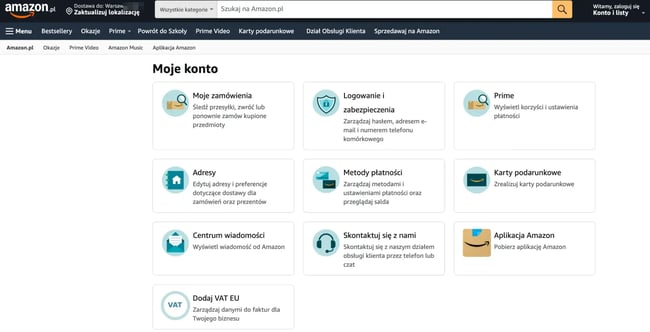
Knowledge base articles are localized with region-specific content such as delivery times, return policies, and payment methods. This way, Amazon ensures relevance across dozens of markets without added headcount.
Why This AI Knowledge Base Example Works
- Multilingual content removes friction for international customers and lowers ticket escalations from non-English markets.
- Region-specific knowledge base articles increase accuracy and trust by aligning answers with local policies.
- Chatbot-driven deflection scales globally, reducing pressure on regional support teams.
Enterprise FinTech example: Payoneer’s AI-driven customer support analyzes sentiment and escalates angry chats to a human agent.
Payoneer, a global fintech platform, integrates AI chatbots in its customer support to triage inquiries at scale. The system uses natural language processing to detect sentiment in messages, such as frustration or repeated demands for escalation.
When a customer insists on speaking with a human — as seen in the screenshot — the AI bypasses menus and routes the case directly to a live agent.
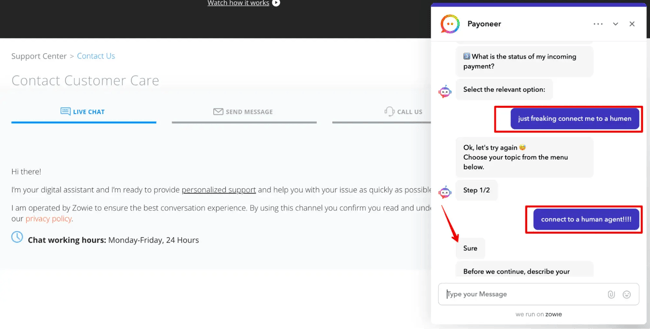
It took me two attempts to escalate the chat, but it worked, and the agent jumped in within a minute.
How to Replicate This AI Knowledge Base Example in HubSpot
- Enable Service Hub chatflows and configure rules to trigger human escalation when certain keywords are detected:
- Add a Question with Free-text Input for Customer Messages.
- Add an If/Then branch, then set up a condition IF the visitor response contains “connect to a human agent”. Users can add similar variations/keywords as additional conditions.
- Configure the Escalation Action.
- Use Breeze Copilot to summarize the escalated chat transcript so human agents enter the conversation with full context.
Why This AI Knowledge Base Example Works
- Escalation logic reduces resolution time for sensitive or complex issues.
- Summarized transcripts improve agent efficiency and reduce customer repetition.
- Balances automation with empathy, showing customers that humans remain accessible when needed.
Enterprise FinTech AI knowledge base example: Payoneer AI-driven FAQs to simplify self-service.
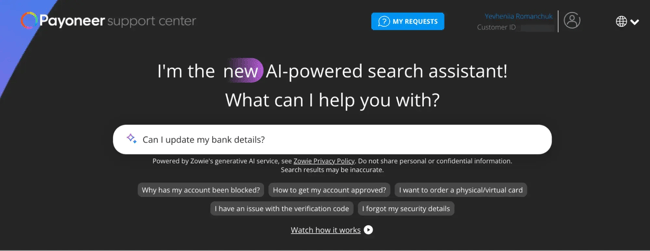
Payoneer’s “I’m the new AI-powered search assistant!” functions as an AI-driven FAQ layer. It sits on top of the knowledge base, parses common customer intents, and serves back ready-made answers in conversational form.
For customers, it saves time on getting a direct answer quickly. Plus, customers don’t need to know which article to click or where to look. The assistant interprets intent and surfaces the right snippet.
Why This AI Knowledge Base Example Works
- AI assistants prevent users from being stuck in loops.
- Responses are powered by current KB content and policies, reducing the risk of outdated guidance.
- The AI absorbs high-volume, low-complexity queries so human agents can focus on sensitive or high-value cases.
Buyer’s Checklist for the Best AI Knowledge Base Software
To select AI knowledge base software, CX leaders weigh in on technical capabilities, governance, and usability. The following checklist outlines the core features that determine whether a platform can scale beyond basic deflection and support long-term customer experience goals:
- Unified data layer: All knowledge base, CRM, and interaction data stored in one system to avoid silos.
- Agent assist: Suggested replies and context pulled from KB content, policies, and order history.
- AI content maintenance: Automatic detection of outdated or low-performing articles with draft updates.
- Chat and email deflection: AI-driven suggestions embedded across support channels to reduce tickets.
- Permissions and governance: Role-based access, approval steps, and audit trails for content updates.
- Analytics: Metrics on deflection rates, fallback frequency, article usage, and agent adoption.
- Multilingual support: Native handling of translations, localized KB variants, and language targeting.
- Quick time-to-value: Deployment within weeks, not months, with minimal engineering overhead.
HubSpot Service Hub delivers all these capabilities on a single platform with a shared data layer, native AI (Breeze agents), and proven service workflows that scale from startup to enterprise.
Tips for Building AI Knowledge Bases
AI tools streamline knowledge base development and maintenance. Teams can use these tools to analyze data from support tickets, identify content gaps, and create the content to guide customers. AI excels at cross-referencing existing articles with new information and managing updates at scale.
Here are tips for making the most of AI in your knowledge base.
Make the most of data.
Start with the data, and use AI to help analyze it. Service teams can find friction points by evaluating support ticket themes, customer feedback, or other sources of data. AI can help you surface the most important challenges to address.
I personally leverage AI to help me cross-reference support ticket data and customer pain points to surface the top themes. In my prompt, I specifically ask AI to focus on themes that I can address with education or training. I think it’s incredibly important to consider customer feedback in every step of the journey, and using AI to analyze that feedback makes the process much quicker!
Find the gaps.
If the team’s customer support software has an AI component, it can easily surface content gaps and show what questions aren’t being answered with existing articles. AI tools like Breeze might even offer to write knowledge base content based on support tickets.
Host your knowledge base on an AI-powered platform.
When the knowledge base software leverages Natural Language Processing (NLP), the search function can understand more than just keywords. By understanding sentiment and the core of their questions, AI platforms can assign the most relevant articles to help.
Bonus points if it offers an AI-Assist that creates a summarized response for customers. That gives them the option to skim as they self-serve!
Frequently Asked Questions About AI Knowledge Bases
1. Can AI knowledge bases safely suggest answers without sending something incorrect?
AI suggestions are only as safe as the guardrails around them. AI has to pull answers from approved KB content, show where the answer came from, and send sensitive replies to a human for approval. This is called a human-in-the-loop workflow.
In HubSpot, Reply Recommendations and Breeze Copilot can be configured to only draft from within mandatory approval rules in the Help Desk for regulated replies.
2. How do we measure deflection and agent assist impact?
Track impact by comparing suggested versus used articles, percentage of inquiries resolved without an agent, assisted replies sent, time saved per reply, and improvements in first-response quality.
HubSpot provides Service Analytics dashboards that show article usage, deflection rates in chat, and adoption of Reply Recommendations. All these give clear visibility into both self-service and agent productivity.
3. What content should we start with to get quick wins?
When building a new AI-powered knowledge base, start with the most frequently asked questions. By analyzing support ticket data and customer feedback, teams can identify which questions customers ask most often and start there.
If your business model is fairly simple, this might look like creating an FAQ document or troubleshooting guide. If your product is complex, you’ll likely need to create content that caters to multiple stages of the user journey.
Teams should have basic “getting started” documentation that shows customers how to use the product or service and how to quickly see value with it. How-to guides can be useful here if teams are looking to show customers how to achieve an outcome or complete an action with the product.
4. When should we roll out multilingual AI self-service?
Multilingual support is most effective after core content is stable and demand is proven. Starting with a small set of high-volume languages, and then expanding, reduces overhead.
HubSpot allows support teams to create language variations of KB articles, map language preferences in Smart CRM, and deliver localized experiences through chatflows.
5. How often should we review or retrain our AI knowledge base?
Many teams add a monthly review step where AI suggestions for updates are triaged by content owners.
A simple method for that is to employ HubSpot’s Breeze Intelligence to flag articles with low usage or high fallback rates and to draft updates. Then, the articles can be routed for SME approval through Service Hub workflows.
Moving from AI Knowledge Base Examples to Action
As demonstrated by leading AI knowledge base examples, artificial intelligence features are moving fast from “nice to have” to baseline expectation in customer support. The pressure is coming less from vendors and more from customers, who expect immediate, accurate answers on their own terms.
That shift is forcing service leaders to rethink how knowledge is created, maintained, and delivered.
What stands out to me in these AI knowledge base examples is how the conversation has matured. It’s no longer about whether AI can handle simple tickets. Now, it’s about how teams design systems that stay reliable as products, policies, and customer behavior change.
AI-powered knowledge bases are the way to make human support more focused, credible, and resilient.
Ready to see how AI can transform your support? Start free or get a demo with HubSpot.

